

AI × CAD and Engineering Data Utilization Advisory
STEP analysis, feature recognition, mold DFM, and safely connecting LLMs to design data
Opening 3D data to count holes for every quote. The mold maker's "this shape won't release" always arriving after design is finished. Management calling for "AI in design" while ChatGPT cannot read a STEP file you hand it. Scenes like these repeat daily on design floors.
Developing CADAS, our 3D CAD viewer and AI analysis tool, we implemented STEP parsing, shape analysis, mold DFM and LLM integration ourselves and verified accuracy against models with known design values. From analysis platforms that never send design data outside, automated take-offs through feature recognition, automated design checks, safe LLM integration, to local LLM use of confidential design information, we advise based on what we have actually built and run.
AI × CAD & Engineering Data
Advisory on turning 3D CAD and engineering data into AI-ready technical assets — strategy and implementation
Your drawings and 3D data are your biggest untapped technical asset. Make them readable by AI.
Generative AI can now read documents and code — but 3D CAD data (STEP) and drawings are still opaque to it. Only when geometry is structured into features (holes, counterbores, fillets, draft, wall thickness) do applications such as automated quoting, automated design checks and AI-assisted design review become possible. We engineered CADAS, a 3D design analysis platform that pairs rigorous shape analysis by a geometry kernel with an LLM specialized for engineering data. From feature recognition, mold DFM verification and mechanism inference — analyzing the B-Rep structure of STEP (ISO 10303) directly — to AI-generated design reviews, everything runs on a single foundation, publicly available. Building on this proven technology, we advise you on putting your CAD and engineering data to work with AI. In fact, we are seeing a growing number of concrete inquiries from manufacturers on themes such as capturing and passing on the design knowledge embedded in CAD data with AI.
Familiar scenes on the engineering floor?
- "Someone must have designed a part like this before" — but searching takes longer than modeling, so you start from scratch again
- Every quotation starts with opening the 3D data and counting holes by eye — counterbores and countersinks sorted manually into a spreadsheet, and any miscount comes straight out of the margin
- The call from the mold maker — "this shape won't release" — always arrives after the design is finished
- Design reviews flag the same things every time — draft, wall thickness, radii — yet it is still a veteran's eye that has to catch them
- The engineer who knows the intent behind every drawing retires next year, and with him goes the answer to "why this tolerance?"
- The 3D data exists, but procurement and sales have no CAD licenses, so they keep asking you to "paste a screenshot"
- Management says "use AI in design" — but handing a STEP file to ChatGPT gets you nowhere; it cannot read the geometry
- Meetings with the mold maker are a back-and-forth of 2D drawings and email. Confirming "what does this area actually look like?" takes days, and misunderstandings only surface at the first tool trial
- Design data is scattered across file servers, PDM and personal folders — nobody is sure which version is current, and matching past quotations to past geometry is practically impossible
- The veteran's know-how was never written down. The "somehow this radius feels right" is buried inside the CAD data, and it is not being passed on
- The CAD data records everything about "how it was designed" — but "why this compensation value, why this process split" is written down nowhere
- Precisely because drawings are confidential, uploading CAD data to an unknown external cloud is not an option. If cloud AI is off the table, an on-premises AI (local LLM) is the answer — but where do you even start?
CADAS — our in-house 3D design analysis platform (trial edition publicly available)
To attack these problems with technology, we engineered "CADAS", our own 3D design analysis platform. Its geometry kernel performs rigorous analysis of the B-Rep structure of STEP (ISO 10303) files, and an LLM specialized for engineering data interprets the measured results — feature recognition, mechanism inference, mold DFM verification and AI design review, all on a single foundation. A fully offline mode analyzes CAD data — and other confidential engineering information — without uploading it to any server. STEP data exported from all major 3D CAD systems — CATIA, NX, Creo (Pro/ENGINEER), SolidWorks, Inventor, Fusion 360, Solid Edge — can be analyzed as-is*. Below are screenshots of the platform in operation (UI is currently in Japanese).
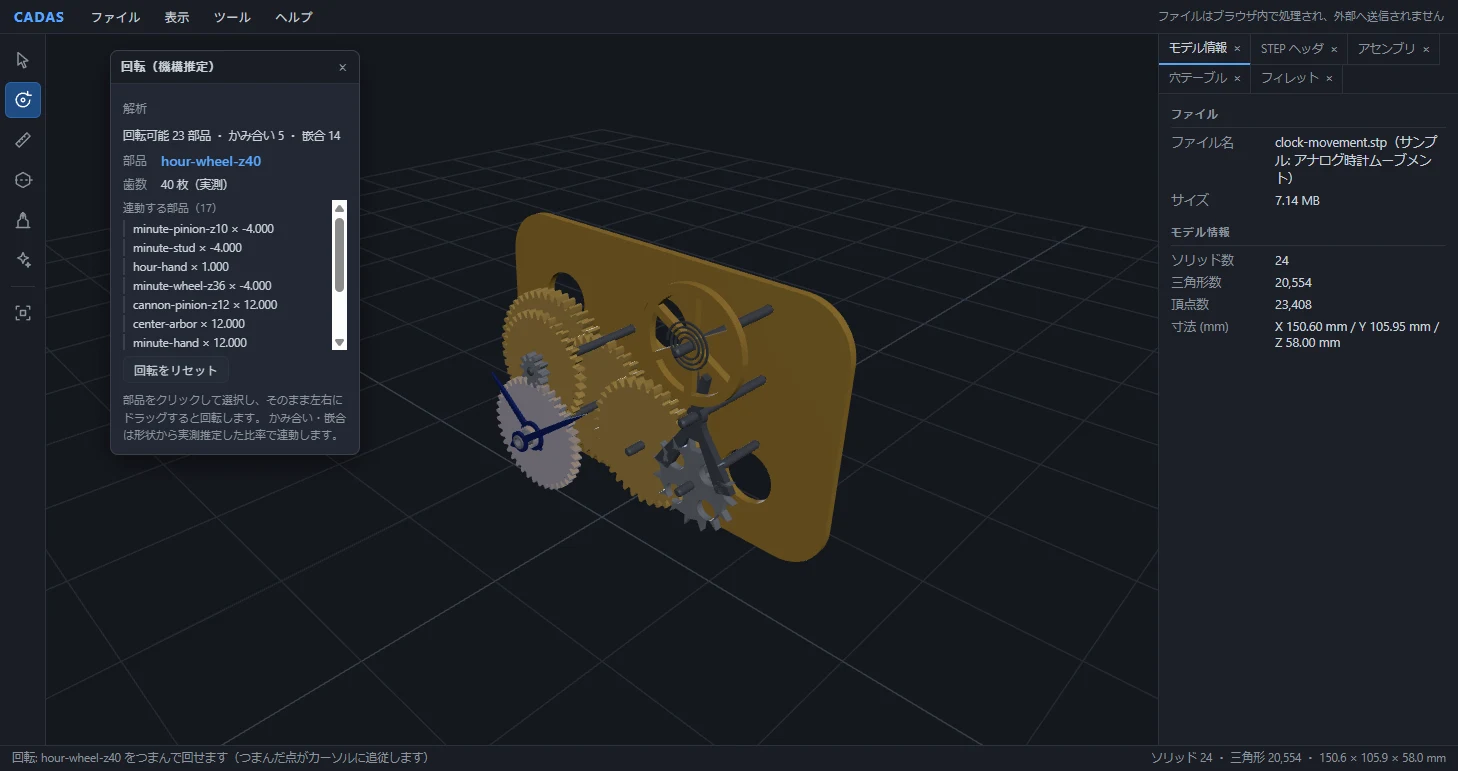
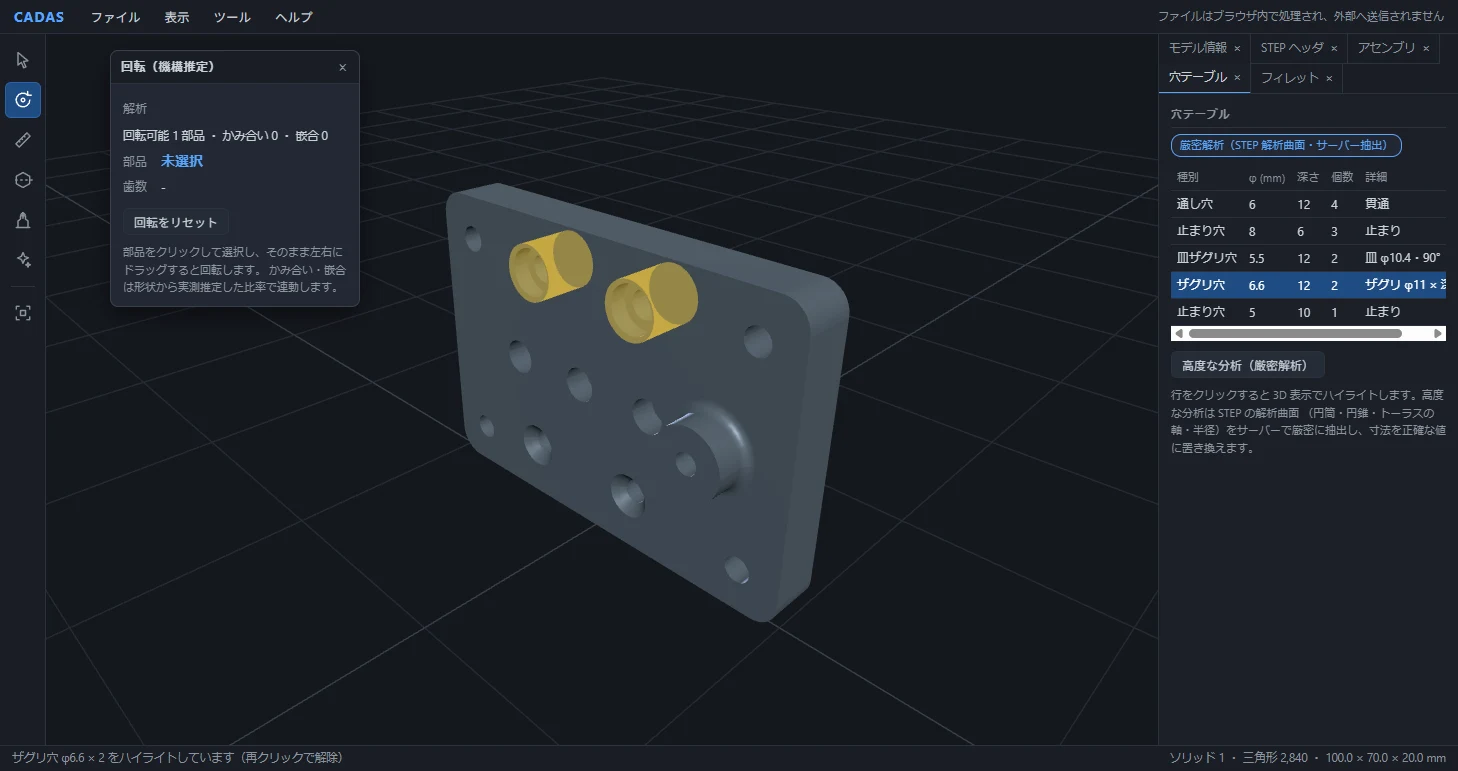
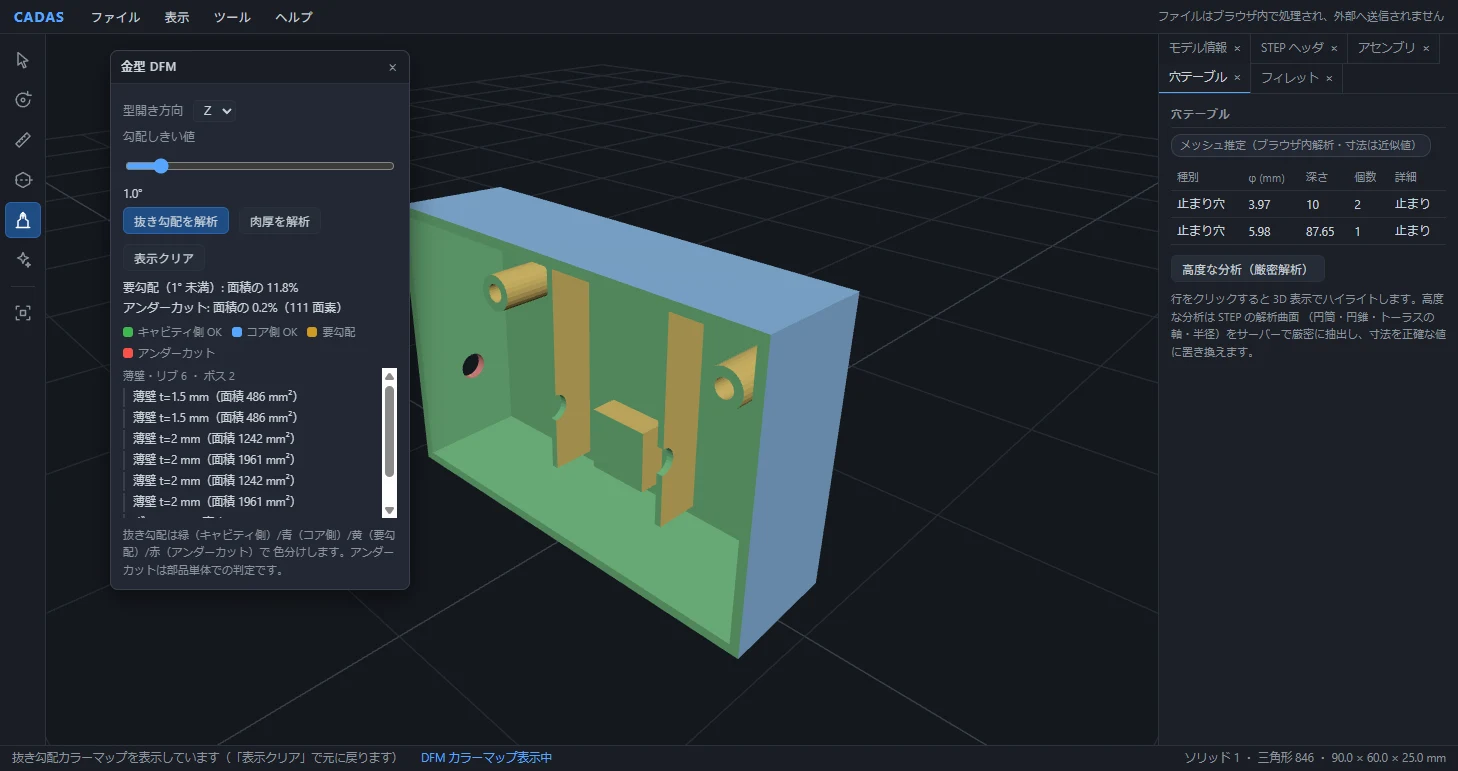
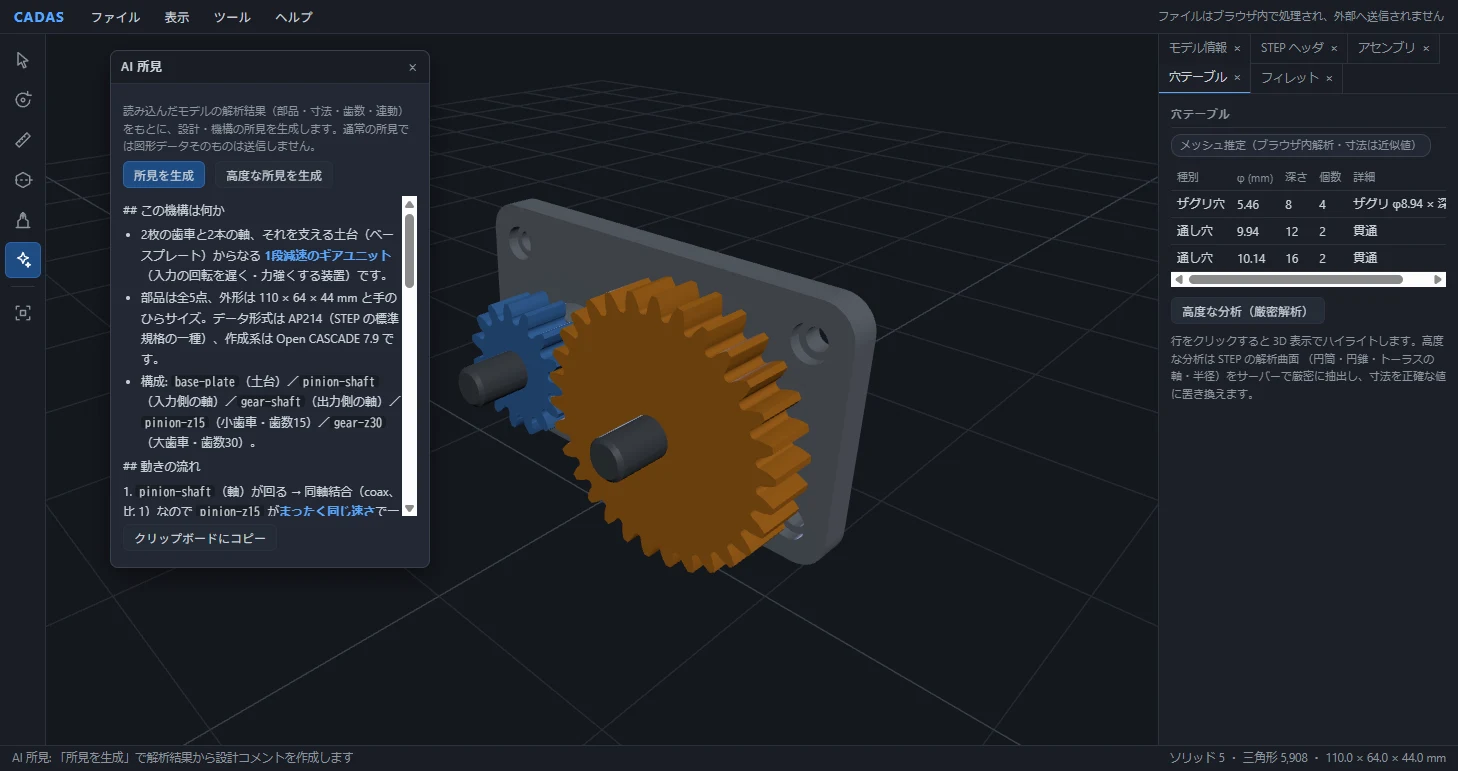
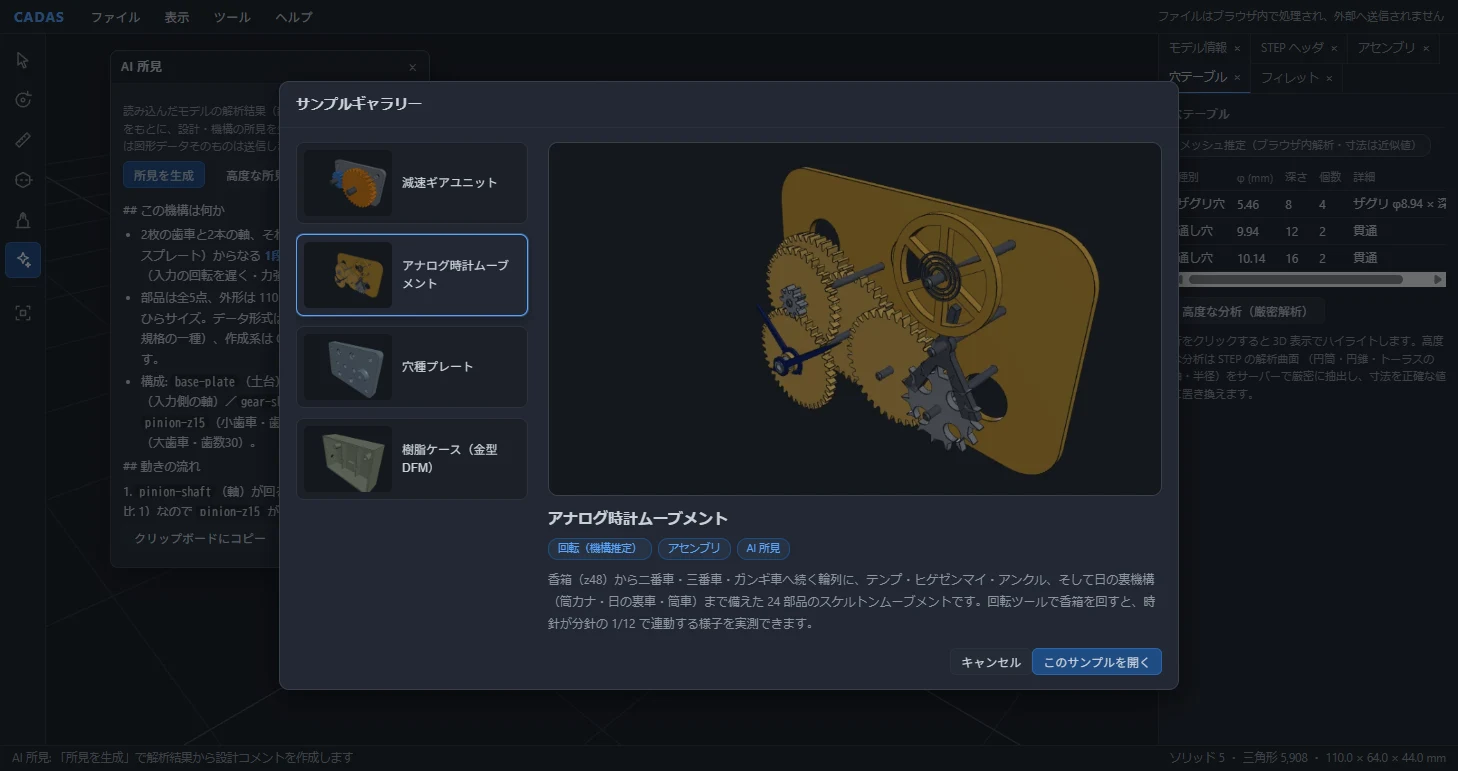
Free, no sign-up. The fully offline mode analyzes your CAD data without uploading it to any server.
Full-featured and enterprise configurations, extended to your design standards and workflows, are available through our free consultation.
* The analysis target is the STEP format (AP203/AP214/AP242). Use your CAD system's standard export to convert to STEP.
Advisory areas
CAD data visualization & sharing platforms
- High-precision STEP analysis and 3D visualization powered by a geometry kernel
- 3D data access for teams without CAD licenses
- A shared view so design, manufacturing and procurement discuss the same 3D model
- Architectures that keep data on-premises
- Embedding analysis and visualization into your products and systems
Feature recognition & shape analysis
- Automatic extraction of holes, counterbores, fillets
- Exact B-Rep (analytic surface) analysis
- Automating take-offs for quoting and process planning
- Structuring geometry into features
Automated design checks & DFM
- Draft, undercut and wall-thickness checks
- Detecting manufacturability features (ribs, bosses)
- Turning design standards into automated rules
- Catching rework early (front-loading)
LLM × engineering data
- Structuring 3D/drawing data for LLMs
- AI-assisted design review and commentary
- Extracting and verbalizing design intent and tacit know-how
- Prompt-injection defenses and usage controls
Local LLMs & on-premises AI
- Local-LLM architectures that keep design data in-house
- GPU and model selection, rollout planning
- Surrounding security: access control, audit logging
- Sorting out your cloud-AI usage policy
Engineering-data assets & unified management
- Auditing your 3D CAD data assets and planning their use
- Unifying scattered design data and searching past projects
- Linking quotations and cost data to geometry
- Approaches to similar-shape search; PoC design
Expertise we can share (examples)
Building CADAS meant implementing everything ourselves — from parsing STEP (ISO 10303) to shape analysis, DFM and LLM integration — and validating the results against models whose design values were known in advance. We share insights grounded in having actually built and run these systems. These are examples; we can support you across a much wider range of topics.
CAD analysis platforms that keep engineering data in-house
Completing geometry-kernel analysis without transmitting any data structurally eliminates the risk of drawing and design-data leakage — a proven platform design for environments where confidential data must not leave the company, and for teams without CAD licenses. We explain it from implementation experience.
B-Rep feature recognition engineering
We implemented a two-tier engine — statistical estimation from meshes plus exact analysis of the analytic B-Rep surfaces in STEP — to classify holes, counterbores, countersinks and fillets. We can walk you through the accuracy trade-offs and how this feeds quoting and process-planning automation, as the people who built it.
Algorithm design for automated mold DFM verification
Draft-angle classification, raycast-based undercut detection and wall-thickness estimation, and rib/boss detection — with detection power demonstrated against test models containing deliberately planted defects. Beyond encoding your design standards as automated verification, this doubles as a communication platform: design and the mold maker sharing the same 3D model and the same verification results, cutting off rework born of misunderstanding.
Architectures that connect LLMs and engineering data safely
LLMs cannot interpret 3D data directly, so how the geometry is structured before it reaches the model is the heart of the design — together with prompt-injection defenses, usage controls and architectures that keep confidential data out of the model, all of which we explain with working implementations.
Local-LLM platforms for confidential engineering data
LLM infrastructure is our core business — from building GPU environments to deploying and operating local LLMs. Even where cloud AI is off-limits, we design platforms that keep design data entirely in-house: GPU and model selection, rollout plans, and the surrounding security (access control, audit logging) tailored to your requirements.
Extracting and formalizing tacit design intent
CAD data records the "what" of a design — never the "why". Our methodology grounds AI strictly in facts measured by the geometry kernel: the AI poses well-aimed questions to your veterans to draw out the reasoning behind decisions, then stores it as decision-rationale-condition-result sets linked to the geometry (features). Keeping the AI from speculating beyond the measured facts is what makes the system trusted on the shop floor.
Making design-knowledge AI a system that actually gets used
Projects in this space fail when they start from a predetermined solution. We first identify — through shop-floor interviews and root-cause analysis — which operations, which data and which judgment knowledge can genuinely be made reusable with AI, then run feasibility studies on both the workflow and the technology plus a small proof with limited data before any investment decision. Metrics are defined upfront and measured: time to find past projects, similar-shape search hit rates, the number of judgment insights captured. We bring this as a proven project template from actual engagements.
What you get
We prove it with implementations
Everything shown above runs in the publicly available CADAS platform today. We explain with working systems, not slides.
Full stack, from geometry kernel to LLM
From the STEP standard and B-Rep geometry processing up to LLM integration and AI agents — covered end-to-end by one team, so "make our design data AI-readable" does not remain a concept.
A path to your own solution
With the CADAS technology base at its core, we build analysis and verification solutions optimized for your design standards and workflows — with staged rollouts that establish proof in a small PoC before scaling.
Related Resources
We publish hands-on, measured articles on AI × CAD and engineering data on the Qualiteg Blog.
![[AI×CAD] Part 6: Show What Changed in 3D — Compare and Share STEP and STL Revisions in Your Browser](https://journal.qualiteg.com/content/images/size/w600/2026/10/ai-cad-step-viewer-part6-en-1.png)
[AI×CAD] Part 6: Show What Changed in 3D — Compare and Share STEP and STL Revisions in Your Browser
A moved sensor, larger mounting holes, and added or removed parts: use an interactive CADAS comparison to see how design changes can be shared with procurement and assembly teams. Instead of handing over only the finished revision and letting the recipient hunt for differences, overlay the before-and-after geometry so people outside design can verify what changed themselves.
![[AI×CAD] Part 5: Preserve the "Why" That CAD Alone Cannot Explain — A Practical Approach to Design Knowledge and Local LLMs](https://journal.qualiteg.com/content/images/size/w600/2026/09/ai-cad-step-viewer-part5-en.png)
[AI×CAD] Part 5: Preserve the "Why" That CAD Alone Cannot Explain — A Practical Approach to Design Knowledge and Local LLMs
CAD records the final geometry, but geometry alone cannot explain why. Ask designers questions grounded in geometric facts, preserve their reasons alongside the model, and use revision comparisons to put design knowledge and local LLMs in a practical workflow.
![[AI×CAD] Part 4: Review a Design with AI Without Sending 3D Geometry to the LLM — Analyze First, Then Pass Structured Results](https://journal.qualiteg.com/content/images/size/w600/2026/09/ai-cad-step-viewer-part4-en.png)
[AI×CAD] Part 4: Review a Design with AI Without Sending 3D Geometry to the LLM — Analyze First, Then Pass Structured Results
CADAS analyzes tooth counts, couplings, holes, and fillets before sending a structured summary to an LLM. See actual insights, the request JSON, and the controls behind a design-review workflow that keeps the original 3D file out of standard AI requests.
![[AI×CAD] Part 3: Catch "This Shape Won't Release" While You Design — Automatic Mold DFM Checks (Draft Angles, Undercuts, Wall Thickness) in a Browser](https://journal.qualiteg.com/content/images/size/w600/2026/09/ai-cad-step-viewer-part3-en.png)
[AI×CAD] Part 3: Catch "This Shape Won't Release" While You Design — Automatic Mold DFM Checks (Draft Angles, Undercuts, Wall Thickness) in a Browser
Draft angles, undercuts and local wall thickness can be pre-checked from geometry once you pick the mold-opening direction. We ran CADAS's mold DFM on a plastic case with deliberate defects and explain how it reaches 11.8% needs-draft, 0.2% undercut (side hole only) and a 2.00 mm median thickness.
![[AI×CAD] Part 2: Still Counting Holes for Every Quote? Picking Up Holes, Counterbores and Countersinks Automatically from STEP B-Rep](https://journal.qualiteg.com/content/images/size/w600/2026/08/ai-cad-step-viewer-part2-en.png)
[AI×CAD] Part 2: Still Counting Holes for Every Quote? Picking Up Holes, Counterbores and Countersinks Automatically from STEP B-Rep
In STEP exported with analytic surfaces, hole, counterbore, countersink and fillet dimensions are recorded as numbers. We show how CADAS feature recognition turns 12 holes into a 5-row table with the exact STEP-recorded dimensions.
![[AI×CAD] Part 1: Nobody Outside the Design Department Can See Your 3D Data — Solve It Free, in a Browser](https://journal.qualiteg.com/content/images/size/w600/2026/08/ai-cad-step-viewer-part1-en.png)
[AI×CAD] Part 1: Nobody Outside the Design Department Can See Your 3D Data — Solve It Free, in a Browser
We released CADAS, a free 3D viewer that opens STEP files in your browser. No install or sign-up. Viewing, measuring and sectioning are processed in-browser and files are never transmitted — shown with real screens and measurements.
Frequently Asked Questions
Our drawings are confidential and we cannot send CAD data to external cloud AI. Can we still use AI?
Yes. We design both an analysis setup in which geometry-kernel processing completes without sending data, and a local LLM platform that keeps design information entirely in-house, including GPU and model selection, rollout plan, access control and audit logs. Building GPU environments and deploying and operating local LLMs is one of our core businesses.
Can the take-off of holes and counterbores for quoting be automated?
We have implemented an engine that classifies holes, counterbores, countersinks and fillets in two stages: estimation from mesh statistics and exact extraction by analyzing the STEP analytic surfaces (B-Rep) directly. As the people who built it, we can explain the accuracy characteristics of each method, when to use which, and how to apply it to quoting and process planning.
We want fewer reworks from the mold maker. Can DFM checks be automated?
We have implemented draft angle classification, undercut detection and wall thickness estimation by ray casting, and rib and boss detection, and confirmed detection power on verification models with intentionally embedded defects. We help you turn your design standards into automated checks and build a shared platform where design and the mold maker look at the same 3D model and results to cut rework.
Can AI preserve the know-how of veteran designers?
CAD data records how something was designed, not why. We provide a method in which AI, grounded only in facts measured by the geometry kernel, asks veterans targeted questions to draw out their reasoning and stores decision, rationale, conditions and outcome tied to features. We do not start from a solution: on-site interviews and a small proof on limited data come before any investment decision.
CONTACT
Contact Us
For questions or consultations about AI Technology Consulting,
please feel free to contact us.